Description
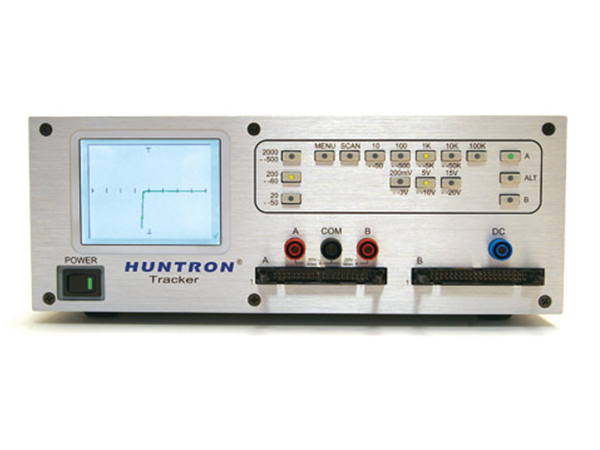
The Tracker 2800S’s features variable range parameters resulting in over 100 combinations of voltage, source resistance and frequency. The 2800 series is a great off-line support tool for the automated Huntron Access Prober diagnostic systems. The Tracker works by applying a current-limited AC signal across two points of a component. The current flow causes a vertical signature deflection, while the applied voltage causes a horizontal deflection. Together they form a unique V/I signature that represents the overall health of the device under test. Analyzing the signature can quickly determine whether the component is good, bad, or marginal. The Tracker 2800S uses a color touch screen for control of selected features such as DC Voltage Source control and Channel A/B alternating rate.
The Huntron Tracker 2800S series display provides a very fast screen refresh rate that approaches the speed of an electrostatic CRT display for quick screening of component pins.
The enhanced range selections complement the Huntron Tracker Model 30 ranges as well as provide expanded test coverage. Huntron SigAssist is based on the range selection, the range parameters are used calculate and display numeric information. The Values displayed are resistance(in ohms), capacitance (in farads), power (in watts), and forward and reverse breakdown voltage (in volts). Today’s portable electronic devices use 3 volt or lower logic circuits. The low test voltage ranges of the Tracker 2800S make it an ideal tool to troubleshoot these products.
The Tracker 2800S feature a built-in DC Voltage Source that can be used to power gated devices such as TRIACs, SCRs and relays. This gives you a true dynamic test of these types of devices.
The Huntron® Tracker® 2800S extends the capabilities of the popular Tracker 2800 to scan and compare up to 40 pins per channel using PCB interface cables or standard IC clips and cables. Comparison can take place manually or automatically allowing you to pick out the signatures differences quickly. The Tracker 2800S can save you time when compared to testing with hand probes.
FAQ's
Q: What are the primary differences between the Tracker 2800 and the 2800S?
Answer: The Tracker 2800 and the 2800S are identical in function except the 2800S has a built-in scanner function that allows you to connect ribbon cables to two 40 pin IDC-style connectors on the front panel. Easily constructed custom cables can be interfaced to connectors on a PCB or use IC clips (not included) to test ICs on a circuit board (see image). The scanning function allows you to step through the pins on a device much faster than probing by hand.
Q: Can the Tracker 2800S be used with the Workstation software?
Answer: Yes. The Tracker 2800S can be used with the Huntron Workstation software. The Tracker connects to the PC through a USB port on the back panel. The software is optional and needs to be purchased in addition to the Tracker.
The Workstation software lets you capture and store Tracker signatures on a circuit board so they can be used for comparison when troubleshooting bad boards. Go to the Workstation software web page for more information.
Q: What are the primary differences between the Tracker 2800S and the Tracker 3200S ?
Answer: The Tracker 2800S and the Tracker 3200S are very similar in overall function but their purposes are different.
The Tracker 3200S is designed to be connected to optional automation hardware such as Access Probers .
The Tracker 3200S includes the Workstation software where it is optional with the Tracker 2800S.
The Tracker 3200S has two 64 pin front panel scanning connectors with selectable common pins used with custom cables or DIP clips. The Tracker 2800S has two 40 pin connectors and common is connected using the front panel COM banana jack.
The Tracker 2800S has a scaled down selection of ranges since front panel push buttons are used for setting range combinations.
The Tracker 3200S has the full compliment of ranges available with Huntron Workstation.
Q: Where can I find IC clips and cables for the 2800S scanner?
Answer: IC clips that connect through ribbon cables to the scanner connectors on the Tracker 2800S front panel are readily available from companies such as Digi-Key , Pomona Electronics , Warwick Test Supplies and Shawtronics . Clips and cables come in different pin counts and spacing with the most common being 0.1″ (2.54mm) that fit standard through-hole ICs. SOIC (small outline) clips are also available for clipping onto 50mil lead spaced surface mounted ICs.
To make your own cables you will want the 40 pin IDC ribbon cable connectors that fit the scanner connections. The manufacturer part numbers are 1658620-9 (connector socket) and 499252-1 (connector strain relief) . These parts are also available directly from TE Connectivity (search using the listed part numbers).
We have a detailed drawing showing how you can construct your own DIP clip cable using readily available parts: Download DIP clip cable construction drawing
Q: Are custom interface cables for the 2800S scanner connections easy to make?
Answer: The Tracker 2800S uses a standard 40 pin IDC connector on the front panel so custom cables are easy to construct. You will need a 40 pin IDC socket (listed above) with 0.1′ spacing, ribbon cable with no more than 40 conductors, the connector that mates to the PCB jack or plug being tested and the tools to assemble the custom cable.
Q: Can the Tracker 2800S be used with an Access Prober?
Answer: No. The Tracker 2800S can be used with the Huntron Workstation software but otherwise is a stand alone instrument.
The Access Probers can be connected to the Tracker 3200S .
Q: My Tracker 2800S does not have a USB port. Can it be upgraded?
Answer: Possibly. Contact Huntron directly to discuss upgrade options.


Reviews
There are no reviews yet.